Published
- 4 min read
How Variables Work in Python
TL;DR
- Python variables are labels (names) that reference objects, not fixed-type “boxes”.
- Assigning a value creates an object; the variable is simply bound to it.
- Reassigning a variable rebinds it to a new object.
- Copying a variable copies the reference, not the object.
- Immutable operations create new objects; mutable objects can be modified in place.
- Objects are cleaned up when no references remain.
Variables in Python work differently from how variables are often taught in many other programming languages.
In languages like Java and C++, variables are commonly explained using a “box” mental model. In this model, declaring a variable creates a container that can only store values of a specific data type.
Think of it like having a special box that only accepts apples. If you want to store another apple, you can replace the existing one. But if you try to store an orange, it will be rejected because the box only accepts apples.
       int number = 10;   // variable with an integer type

number = 30;      // allowed: same data type

number = "key";   // not allowed: type mismatch
This “box” analogy is useful for learning, but it doesn’t accurately describe how Python works.
In Python, variables are better understood as labels, not boxes.
Variables are Labels, not Boxes
Consider the following Python code:
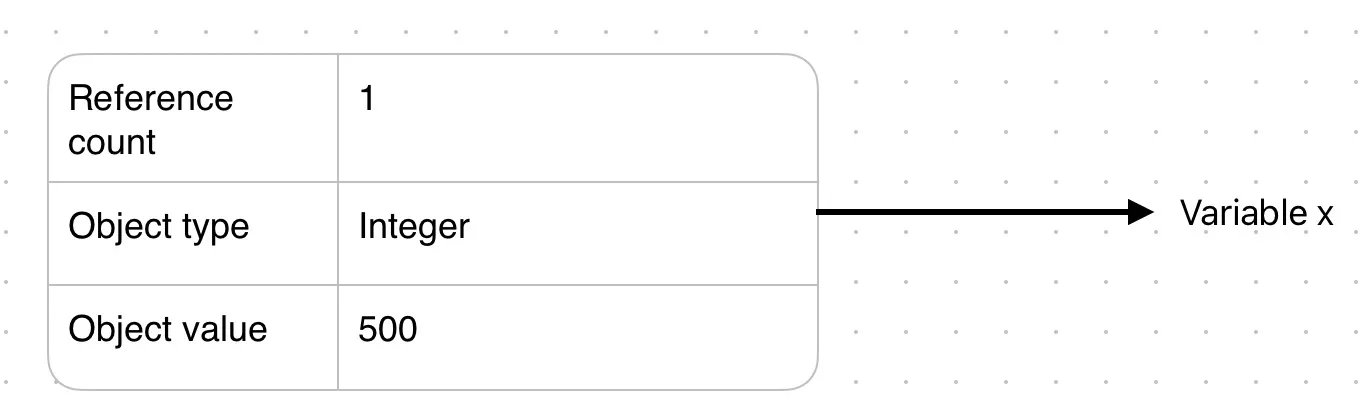
x = 500When this line runs, Python creates an object in memory that represents the value 500. This object has:
-
a type (integer),
-
a value (500),
-
and internal bookkeeping information used by the interpreter.
The variable name x is then bound to that object. In other words, x becomes a label that refers to the object.
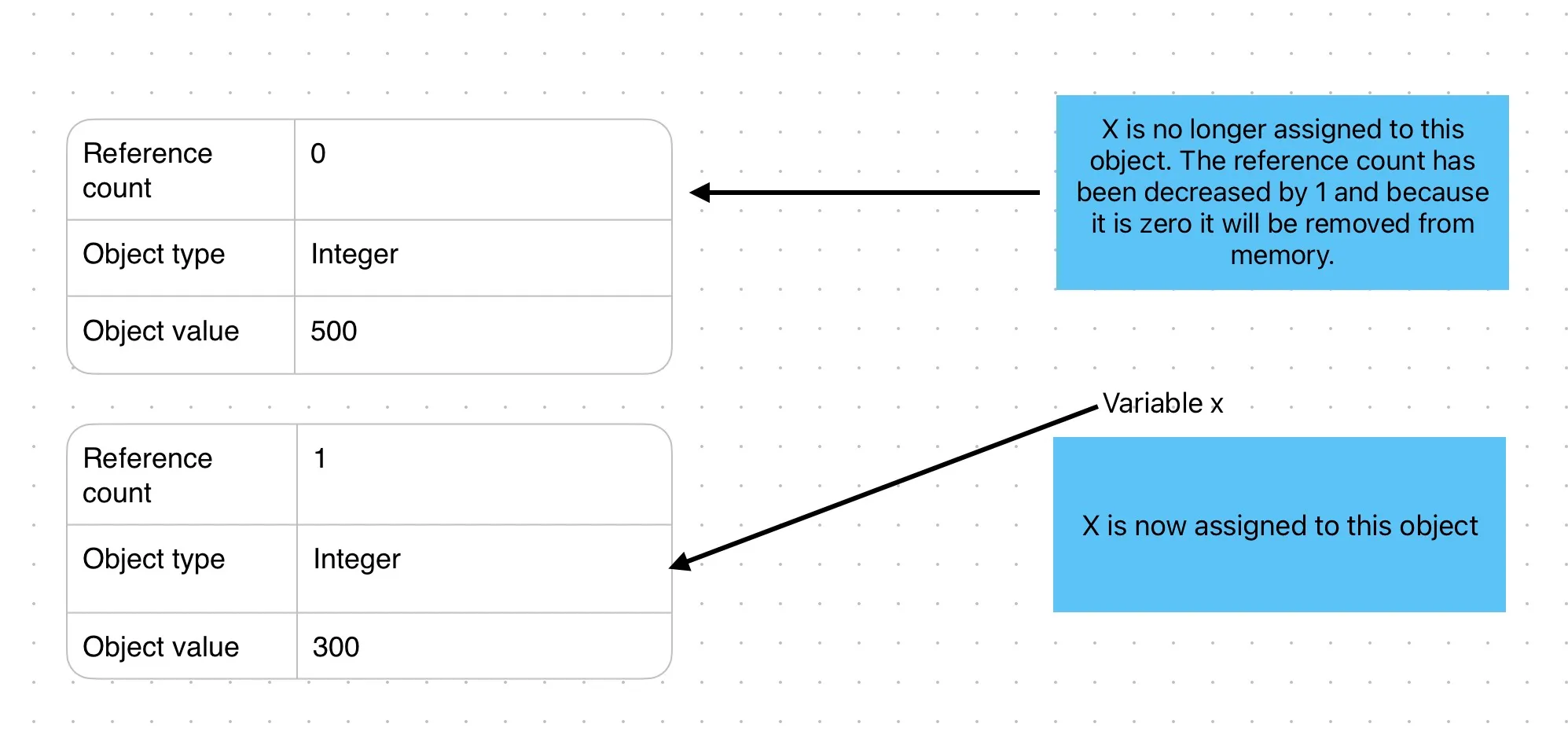
If you later assign a different value to x, Python simply rebinds the label to a new object and no error is raised.
       x = 500              # x refers to an integer object
x = "This is a string"  # x now refers to a string object

print(x)  # This is a string
This behavior shows that Python variables are not containers with fixed types.
They are names that refer to objects.
Everything in Python Is an Object
In Python, all values numbers, strings, lists, functions, and even classes are objects.
When you assign a new value to a variable, Python creates a new object and binds the
variable to it. Internally, CPython (the most common Python implementation) represents
objects using a structure called PyObject, but this is an implementation detail and
not something you interact with directly.
If a variable is rebound to a new object and no other variables refer to the old one, that object becomes eligible for cleanup.
In CPython, this happens primarily through reference counting: when an object’s reference count drops to zero, it is immediately freed. A separate garbage collector exists to handle circular references.
Operations with Variables
Copying Variables
Copying a variable does not create a new object. Instead, the new variable refers to the same object, and the object’s reference count is increased.
       x = 500
y = x

id(x) # 4452436688 - this may differ for you as memory address will change
id(y) # 4452436688
Both x and y point to the same object in memory.
Math Operations
Math operations such as addition, subtraction, and multiplication create new objects when applied to immutable types like integers.
       x = 10
x = x + 5
Here, Python creates a new integer object with the value 15 and rebinds x to it.
The original 10 object remains unchanged.
Mutability Matters
Reassigning a variable is different from modifying an object.
Some objects in Python, such as lists and dictionaries, are mutable, meaning they can be changed in place.
       a = [1, 2, 3]
b = a

b.append(4)

print(a)  # [1, 2, 3, 4]
In this example, both a and b refer to the same list object. No new object is
created rather the existing object is modified.
Understanding the difference between rebinding names and mutating objects is key to mastering Python variables.